
Compaq ProLiant ML350 Server General Troubleshooting Guide

4-18 Compaq Servers Troubleshooting Guide
Compaq Confidential – Need to Know Required
Writer: Susana Weinstein Salazar Project: Compaq Servers Troubleshooting Guide Comments:
Part Number: 161434-001 File Name: e-ch4 Diagnostic Tools.doc Last Saved On: 9/2/99 1:50 PM
6000 - 6099, Compaq Network Interface Cards
Test Error Codes
The 6000 series of diagnostic error codes identifies failures with various
Compaq Network Interface Controllers. Corrective action may require
replacement of the controller.
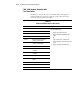
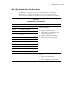
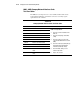
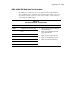
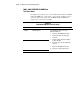
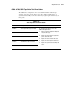
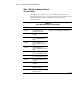
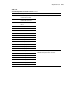
Table 4-10
Compaq Network Interface Cards Test Error Codes
Error Code Description Recommended Action
6000-xx Network card ID failed.
6001-xx Network card setup failed.
6002-xx Network card transmit failed.
6014-xx Network card configuration failed.
6016-xx Network card reset failed.
6028-xx Network card internal failed.
6029-xx Network card external failed.
6089-xx Network card open failed.
6090-xx Network card initialization failed.
6091-xx Network card internal loopback
failed.
6092-xx Network card external loopback
failed.
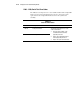
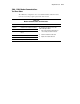
The following steps apply to error codes
6000-xx through 6089-xx:
1. Check the controller installation in the
EISA slot.
2. Check the interrupt type and number
setting.
3. Check the media connection at the
controller and Multistation Access Unit
(MAU).
4. Check the media speed (4/16) and type
Unshielded Twisted Pair/Shielded
Twisted Pair (UTP/STP) settings.
5. Check the MAU, cabling, or other
network components.
6. Replace the controller.