
Compaq ProLiant ML350 Server General Troubleshooting Guide

Diagnostic Tools 4-13
Compaq Confidential – Need to Know Required
Writer: Susana Weinstein Salazar Project: Compaq Servers Troubleshooting Guide Comments:
Part Number: 161434-001 File Name: e-ch4 Diagnostic Tools.doc Last Saved On: 9/2/99 1:50 PM
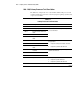
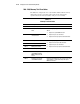
400 - 499, Parallel Printer Test Error Codes
The 400 series of diagnostic error codes identifies failures with parallel printer
interface card or system board functions. Corrective action may require
replacement of the serial/parallel interface board or the system board
assembly.
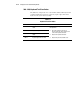
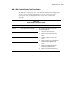
Table 4-5
Parallel Printer Test Error Codes
Error Code Description Recommended Action
401-xx Printer failed or not connected.
402-xx Printer data register failed.
403-xx Printer pattern test failed.
498-xx Printer failed or not connected.
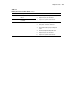
The following steps apply to error codes
401-xx through 498-xx:
1. Connect the printer and retest.
2. Check the power to the printer and
retest.
3. Install the loopback connector and
retest.
4. Check the switch on the Serial/Parallel
Interface board (if applicable) and
retest.
5. Replace the Serial/Parallel Interface
board (if applicable) and retest.
6. Replace the system board and retest.