
Compaq ProLiant ML350 Server General Troubleshooting Guide

4-10 Compaq Servers Troubleshooting Guide
Compaq Confidential – Need to Know Required
Writer: Susana Weinstein Salazar Project: Compaq Servers Troubleshooting Guide Comments:
Part Number: 161434-001 File Name: e-ch4 Diagnostic Tools.doc Last Saved On: 9/2/99 1:50 PM
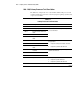
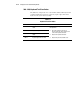
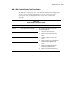
200 - 299, Memory Test Error Codes
The 200 series of diagnostic error codes identifies failures with the memory
subsystem. Corrective action may require replacement of the memory
expansion board, the memory modules, or the processor assembly.
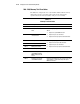
Table 4-3
Memory Test Error Codes
Error Code Description Recommended Action
200-xx Invalid memory configuration. Reinsert memory modules in correct location and retest.
201-xx Memory machine ID test
failed.
202-xx Memory system ROM
checksum failed.
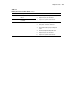
The following steps apply to error codes 201-xx and
202-xx:
1. Replace the system ROM and retest.
2. Replace the processor and retest.
3. Replace the memory expansion board and retest.
203-xx Memory write/read test failed.
204-xx Memory address test failed.
205-xx Walking I/O test failed.
206-xx Increment pattern test failed.
The following steps apply:
1. Replace the memory module and retest.
2. Replace the processor and retest.
3. Replace the memory expansion board and retest.
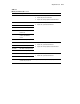
207-xx Invalid memory configuration;
check DIMM installation.
DIMMs installed have 8K
refresh.
Replace DIMMs.
208-xx Invalid memory detected;
check DIMM installation.
Verify memory installed, then refer to your server’s user
documentation for supported memory and replace
DIMMs as indicated.
continued