
Compaq ProLiant ML350 Server General Troubleshooting Guide
Diagnostic Tools 4-7
Compaq Confidential – Need to Know Required
Writer: Susana Weinstein Salazar Project: Compaq Servers Troubleshooting Guide Comments:
Part Number: 161434-001 File Name: e-ch4 Diagnostic Tools.doc Last Saved On: 9/2/99 1:50 PM
■
Hard drives
■ Processor power modules
■ Fans
If Power-On Self-Test (POST) finds an error in the system, an error condition
is indicated by an audible and/or visual message. For the most recent POST
error messages, descriptions, and corrective actions, refer to your server’s
specific troubleshooting guide.
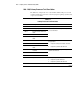
Steps for Compaq Diagnostics
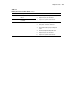
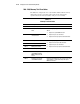
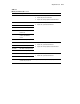
In each case, the Recommended Action column lists the steps necessary to
correct the problem. After completing each step, run the Compaq Diagnostics
utility to verify that the error condition has been corrected. If the error code
reappears:
1. Perform the next action listed in the table.
2. Run the Compaq Diagnostics program again.
3. Follow this procedure until the Compaq Diagnostics program no longer
detects an error condition.