
Compaq ProLiant ML350 Server General Troubleshooting Guide

Compaq Confidential – Need to Know Required
Writer: Susana Weinstein Salazar Project: Compaq Servers Troubleshooting Guide Comments:
Part Number: 161434-001 File Name: e-ch4 Diagnostic Tools.doc Last Saved On: 9/2/99 1:50 PM
Chapter 4
Diagnostic Tools
These utilities were developed to assist you in diagnosing problems, testing the
hardware, and monitoring and managing your Compaq server hardware.
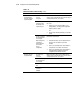
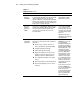
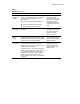
Table 4-1
Diagnostic Tools
Tool What is it? How do I run it?
Compaq
Diagnostics
program
Utility to assist you in testing and/or verifying the
operation of your Compaq hardware. If problems are
found, Compaq Diagnostics will isolate the failure(s)
down to the replaceable part, whenever possible.
Diagnostics and Utilities are
located on the system
partition on the hard drive
and must be accessed when
a system configuration error
is detected during the
power-on self-test). Compaq
Diagnostics software is also
available on the Compaq
SmartStart and Support
Software CD. You can create
a Diagnostics diskette from
the SmartStart and Support
Software CD, and run
Compaq Diagnostics from
the diskette.
continued