
Compaq ProLiant ML350 Server General Troubleshooting Guide

3-2 Compaq Servers Troubleshooting Guide
Compaq Confidential – Need to Know Required
Writer: Susana Weinstein Salazar Project: Compaq Servers Troubleshooting Guide Comments:
Part Number: 161434-001 File Name: d-ch3 Software Problems.doc Last Saved On: 8/28/99 1:30 PM
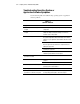
Troubleshooting Operating System or
Application Software Symptoms
Use the following table for troubleshooting operating system or application
software problems.
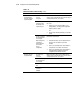
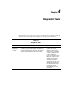
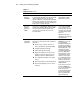
Table 3-1
Software Problems
Symptom Possible Solution
Errors after a software setting is
changed
Check the system logs. Change settings back to original
configuration.
Errors after the system software is
changed
Change settings back to original configuration. If more than one
setting was changed, change the settings one at a time to
isolate the cause of the problem.
Errors after an application is installed Check system settings. You may need to get the settings from
the System Configuration Utility and manually set the software
switches. See your application documentation and/or the vendor
website.
Check for overwritten files.
Check the application documentation to verify which files are
added by the application.
Verify that the installation was completed successfully. Try
reinstalling the application.
Make sure you have the most current drivers. Refer to
“Maintaining Current Drivers” in this chapter.
Printer errors occur after an
application is installed
Make sure all current printer drivers have been installed.
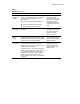
Software crashes Turn off the computer and peripheral devices. Restart the
computer.
Scan for viruses with an updated virus scan utility.
Errors are reported in the error log Follow the information provided in the error log and refer to your
operating system’s documentation.
Operating system cannot load. Run the System Configuration Utility.
Server problems occur after the
application of a software service pack.
The service pack may have overwritten a Compaq-specific file.
See “Operating System Updates” later in this chapter.