
Compaq ProLiant ML350 Server General Troubleshooting Guide

2-28 Compaq Servers Troubleshooting Guide
Compaq Confidential – Need to Know Required
Writer: Susana Weinstein Salazar Project: Compaq Servers Troubleshooting Guide Comments:
Part Number: 161434-001 File Name: c-ch2 Hardware Problems.doc Last Saved On: 8/28/99 1:29 PM
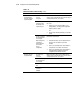
Table 2-14
Network Controller Troubleshooting
continued
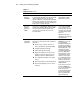
Problem Possible Cause Possible Solution
Network controller
stopped working
when an expansion
board was added.
The cable is not
securely
connected.
Make sure that the cable is securely attached to the
network connector and that the other end of the cable is
securely attached to the correct device.
Network controller
interrupt overlaps
the interrupt of an
expansion board.
Modify one of the overlapping interrupt values. To do
this, either:
1. Reboot your server, and press F10 to access
Compaq Utilities, selecting System Configuration
Utility to make this change.
-Or-
2. Run the setup utility designated by your operating
system.
The files containing
the network drivers
are corrupted.
Reinstall the network drivers.
Network drivers are
not loaded, or
driver parameters
do not match
current
configuration.
1. Verify that the drivers were not deleted when the
drivers for the new expansion board were
installed.
2. Refer to your operating system documentation to
verify that the correct drivers are installed.
3. Refer to your operating system documentation to
verify that the driver parameters match the
configuration of the network controller.
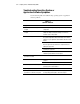
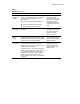
Network controller
stopped working.
The cable is not
securely
connected.
Make sure that the cable is securely attached to the
network connector and that the other end of the cable is
securely attached to the correct device.
The files containing
the network drivers
are corrupted.
Reinstall the network drivers.
No power to the PCI
slot.
Verify that the PCI Hot Plug power LED is on.
The network
controller is
damaged.
Contact your Compaq authorized service provider.