
Compaq ProLiant ML350 Server General Troubleshooting Guide
2-26 Compaq Servers Troubleshooting Guide
Compaq Confidential – Need to Know Required
Writer: Susana Weinstein Salazar Project: Compaq Servers Troubleshooting Guide Comments:
Part Number: 161434-001 File Name: c-ch2 Hardware Problems.doc Last Saved On: 8/28/99 1:29 PM
SCSI Device Problems
If you the SCSI device is not being recognized, make sure the SCSI device is
configured correctly. Refer to the documentation provided with the SCSI
device.
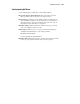
General Items to Check
Non-hot-plug Drives
Compaq ships non-hot-plug hard drives set to ID 0 and CD-ROM drives set to
ID 5.
■ Make sure that each SCSI device connected to the same port on a SCSI
backplane is set with a unique SCSI identification number.
■ Check allocated SCSI IDs in the Compaq System Configuration Utility
prior to beginning an installation procedure to verify that the device you
are adding to a port already connected to one or more SCSI devices is
unique.
■ Verify the that SCSI ID switches are set according to the drive bay
position required for your server. Setting information may be found in
your server’s user documentation, or your hard drive documentation.
Hot-plug Drives
Make sure the hot-plug drives are installed correctly and sequentially, starting
with bay 0. It is not necessary to set the SCSI ID of a hot-plug hard drive; the
backplane board automatically sets the ID when the drive is installed.
Refer to your server’s user documentation for details on correct drive
placement.