
Compaq ProLiant ML350 Server General Troubleshooting Guide

2-24 Compaq Servers Troubleshooting Guide
Compaq Confidential – Need to Know Required
Writer: Susana Weinstein Salazar Project: Compaq Servers Troubleshooting Guide Comments:
Part Number: 161434-001 File Name: c-ch2 Hardware Problems.doc Last Saved On: 8/28/99 1:29 PM
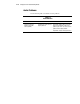
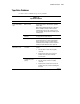
Table 2-13
Tape Drive Problems
continued
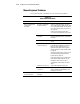
Problem Possible Cause Possible Solution
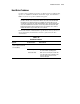
DLT does not read
tape.
DLT is not firmly
connected.
Make sure the DLT is properly seated. Push the DLT
in tightly. If that does not correct the problem,
completely remove the DLT and reseat.
Tape is
write-protected.
Remove write-protection.
If tape still does not work, try another tape.
Tape not compatible
with drive.
Check your tape’s specifications to ensure the tape is
supposed to work with the drive.
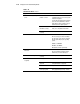
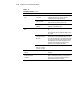
Server cannot see
DLT.
Device conflict exists. Make sure each device on the controller has a unique
ID.
Use the Compaq System Configuration Utility to check
for conflicts.
SCSI terminator
missing for external
DLT drive.
The external DLT drive requires a SCSI terminator to
be attached to the unused SCSI IN connector on the
rear of the drive. DLT drives can be daisy chained. Do
not connect more than three units per SCSI controller.
The last DLT drive in the chain will require the SCSI
terminator. If the terminator is not attached, the
system may not recognize the DLT drive.
Maximum number of
drives per controller
has been exceeded.
Refer to your controller documentation.
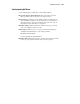
DAT Drive error
displays.
See the “Troubleshooting DAT Drives” section
following.
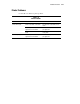
Error occurs during
backup, but backup
completes.
Some errors do not cause a failure. If an error occurs
but does not disrupt the backup, you may be able to
ignore the error. Contact the software vendor for
more information about the message.