
Compaq ProLiant ML350 Server General Troubleshooting Guide

Hardware Problems 2-23
Compaq Confidential – Need to Know Required
Writer: Susana Weinstein Salazar Project: Compaq Servers Troubleshooting Guide Comments:
Part Number: 161434-001 File Name: c-ch2 Hardware Problems.doc Last Saved On: 8/28/99 1:29 PM
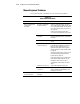
Tape Drive Problems
Use this section to troubleshoot tape device problems.
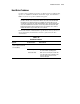
Table 2-13
Tape Drive Problems
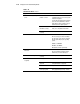
Problem Possible Cause Possible Solution
Server cannot write to
tape.
Drive not clean. Clean the drive. Refer to the instructions provided
with the drive.
DAT cleaning cartridges typically last for 30 passes.
When a cartridge is used up, it will no longer be
automatically ejected once the cleaning cycle has
been completed. The tape must be manually ejected
and disposed of.
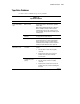
Tape not compatible
with drive.
Check your tape’s specifications to ensure the tapes
are supposed to work with the drive.
Lost dropped leader. Check every DLT cartridge that has ever been used in
the DLT drive. After you locate the bad cartridges,
dispose of them. As soon as a good tape drive is
installed and a bad cartridge is used, the tape drive
will drop its leader and will need to be replaced.
Digital Linear Tape
(DLT) failure occurs.
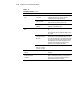
Power or signal cable
not seated.
Check the power and signal cables to ensure proper
seating:
1. Push the cables to ensure they are tightly
connected.
2. If pushing in the cables does not solve the
problem, remove the cables and firmly
reconnect them.
Non-imbedded
controller not seated
properly.
Check the controller to ensure proper seating:
1. Push the controller to ensure it is tightly
connected.
2. If pushing in the controller does not solve the
problem, remove the controller and firmly place
it in again.
continued