
Compaq ProLiant ML350 Server General Troubleshooting Guide

2-20 Compaq Servers Troubleshooting Guide
Compaq Confidential – Need to Know Required
Writer: Susana Weinstein Salazar Project: Compaq Servers Troubleshooting Guide Comments:
Part Number: 161434-001 File Name: c-ch2 Hardware Problems.doc Last Saved On: 8/28/99 1:29 PM
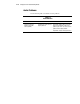
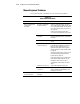
Table 2-10
Hard Drive Problems
continued
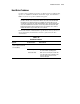
Symptom Possible Problem What to Check
Hard drive not recognized by
server.
Hard drive connection
problem occurred.
Check the LEDs on the hard drive. See
“Hard Drive LEDs” in your server’s specific
troubleshooting guide.
Try removing and replacing the hard drive.
If you remove any hard drives, label the
drive and its position, and make sure you
install it back in its original position.
Conflict with another
hard drive occurring.
Have you recently removed a hard drive?
Have you recently added a hard drive?
Driver problem
occurring.
Install correct controller drivers.
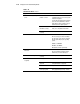
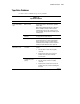
Cannot access data. Files are corrupted. The files on the server may contain viruses.
Run a recent copy of a virus scan utility.
The files on the server may be corrupted.
Run the repair utility for your operating
system.
NetWare, run VREPAIR.
IBM OS/2, run CHKDSK.
Windows NT, run the repair facility.
Server response time slower
than usual.
Hard drive is full. Has the hard disk drive become full?
As a rule of thumb, hard drives should
maintain 15 percent free disk space.
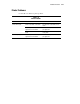
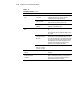
No hard drives are recognized. Power problem
occurring.
Check power to backplane.
New hard drive not
recognized.
Drive bay bad. Try another bay.
Hard drive not
supported.
Refer to your hard drive documentation to
verify that the drive is supported.
Hard drive failed. Replace hard drive.
Hard drive sizes
incorrectly reported.
Run the Array Configuration Utility, or the
utility supplied with your array controller.