
Compaq ProLiant ML350 Server General Troubleshooting Guide

Hardware Problems 2-19
Compaq Confidential – Need to Know Required
Writer: Susana Weinstein Salazar Project: Compaq Servers Troubleshooting Guide Comments:
Part Number: 161434-001 File Name: c-ch2 Hardware Problems.doc Last Saved On: 8/28/99 1:29 PM
Hard Drive Problems
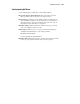
Use this section to troubleshoot hard drive problems. For more troubleshooting
tips, also see “SCSI Device Problems” later in this chapter, and “Hard Drive
LEDs” in your server’s specific troubleshooting guide.
IMPORTANT: If the hard drive Fault LED is on, follow the proper troubleshooting
procedures, find the cause of the problem, and fix it. One common mistake with failed
hot-plug drives in a fault tolerant array is hot-plugging (removing the drive for a few
seconds and reseating the same drive) without fixing the cause. This hot-plugging often
causes the Fault LED to turn off, but does not solve the problem that caused it to light
initially. Usually the drive will need replacing, but in some situations, there could be a
problem with the drive cage, the SCSI cable, or the controller.
For more information on individual drive specifications, refer to your server’s
user documentation, the maintenance and service guide, and to the drive
documentation.
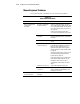
Table 2-10
Hard Drive Problems
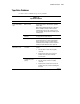
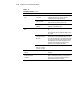
Symptom Possible Problem What to Check
Hard drive fails and your
system completes Power-On
Self-Test (POST).
Hard drive failed. Replace hard drive.
Drive not supported. Replace with hard drive supported by both
the server and the operating system.
A SCSI cable failed. Make sure to check the pins on both ends
of all SCSI cables in the configuration. The
pins and cables may be bent or have
otherwise damaged.
continued