
Compaq ProLiant ML350 Server General Troubleshooting Guide

2-16 Compaq Servers Troubleshooting Guide
Compaq Confidential – Need to Know Required
Writer: Susana Weinstein Salazar Project: Compaq Servers Troubleshooting Guide Comments:
Part Number: 161434-001 File Name: c-ch2 Hardware Problems.doc Last Saved On: 8/28/99 1:29 PM
Diskette Problems
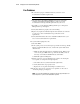
Use the following table to troubleshoot diskette drive problems.
Table 2-7
Diskette Problems
Problem Possible Cause Possible Solution
Diskette drive light stays
on.
Diskette is damaged. Run CHKDSK on the diskette.
Diskette is incorrectly
inserted.
Remove diskette and reinsert.
Software is corrupt. Check the program diskettes or reinstall
software from original media.
Drive cable is not properly
connected.
Reconnect drive cable.
A problem has occurred
with a diskette transaction.
The directory structure is bad,
or there is a problem with a
file.
Run CHKDSK to check for
fragmentation.
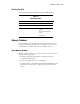
Diskette drive cannot read a
diskette.
Diskette is not formatted. Format the diskette.
You are using the wrong
diskette type for the drive
type.
Check the type of drive you are using
and use the correct diskette type.
Drive not found. Cable is loose. Check all cable connections between
the drive and controller.
Nonsystem disk message
displayed.
The system is trying to start
from a diskette that is not
bootable.
Remove the diskette from the drive.
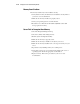
Diskette drive cannot write
to a diskette.
Diskette is not formatted. Format the diskette.
Diskette is write-protected. Use another diskette or remove the
write protection.
Writing to the wrong drive. Check the drive letter in your path
statement.
Not enough space is left on
the diskette.
Use another diskette.