
Compaq ProLiant ML350 Server General Troubleshooting Guide

Hardware Problems 2-13
Compaq Confidential – Need to Know Required
Writer: Susana Weinstein Salazar Project: Compaq Servers Troubleshooting Guide Comments:
Part Number: 161434-001 File Name: c-ch2 Hardware Problems.doc Last Saved On: 8/28/99 1:29 PM
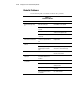
Hot-Plug Fan LEDs
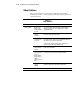
Use the following table to troubleshoot hot-plug fan LED problems.
Table 2-5
Hot-Plug Fan LEDs
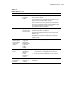
LED Fan Status Possible Solution
Green Power to fan; fan is OK. None required.
Amber Fan problems. Replace fan.
Off No power to fan. Make sure fan is properly
seated.
Make sure power to fan is
good.
Replace fan.
Memory Problems
Use the following steps to troubleshoot memory problems. Be sure the
memory is inserted as required by your server. Refer to your server’s user
documentation to determine if the memory is installed correctly.
Out of Memory Problem
Memory configuration may not be set up correctly or you have run out of
memory to run the application.
1. Check the application documentation to determine the memory
configuration requirements.
2. Check your operating system’s error information.
3. Check the memory count during Power-On Self-Test (POST) messages.
If the memory count is wrong, complete the steps shown in the next
section.