
Compaq ProLiant ML350 Server General Troubleshooting Guide

2-2 Compaq Servers Troubleshooting Guide
Compaq Confidential – Need to Know Required
Writer: Susana Weinstein Salazar Project: Compaq Servers Troubleshooting Guide Comments:
Part Number: 161434-001 File Name: c-ch2 Hardware Problems.doc Last Saved On: 8/28/99 1:29 PM
Power Problems
This section contains methods of diagnosis for all Compaq servers. See the
server-specific troubleshooting guide for your server’s hardware components.
Power Source
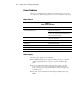
Table 2-2
Power Source Checklist
Item What to Check
Power On/Standby switch Make sure the switch is on.
If your server has a power on/standby switch that
returns to its original position after being pressed,
make sure you press it firmly.
Outlet Plug another device in the grounded AC outlet to
ensure the outlet works.
Power cord Replace the power cord.
Power strip Replace the power strip.
Line voltage Have a qualified electrician check the voltage.
Power supply See “Power Supply” later in this chapter.
Uninterruptible Power Supply (UPS) and cables See “UPS Problems” later in this chapter.
Power Supply
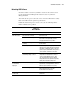
Check the power supplies for the following:
■ Is the LED indicating power supply is working properly. See the table
“Power Supply LED” in the your server’s specific troubleshooting
guide.
■ If you recently added hardware options, be sure you have adequate
power. Use the server’s user documentation and maintenance and
service guide for product-specific information. The power supply may
be at full capacity.
■ Check the system information from the Integrated Management Log
(IML).