
Compaq ProLiant ML350 Server General Troubleshooting Guide


Diagnosing the Problem 1-7
Compaq Confidential – Need to Know Required
Writer: Susana Weinstein Salazar Project: Compaq Servers Troubleshooting Guide Comments:
Part Number: 161434-001 File Name: b-ch1 Diagnosing the Problem.doc Last Saved On: 8/29/99 7:41 PM
Execute the Action Plan
As you complete the following steps, carefully observe each step of the action
plan as it is executed, and watch for the occurrence of new symptoms, or the
elimination of existing ones. Some results are obvious, such as the
introduction of informational or error messages, or of significant changes in
functionality. Other changes may not be as obvious and may require checking
system logs to see if any new event was recorded after the change was made.
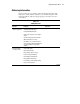
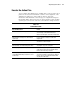
Table 1-2
Action Observation
Question/Observation Action
What are the results of the step? Watch for and record new symptoms, for example,
error messages or informational messages.
Were the results logical, consistent, and expected?
Did anything at all change? If so, what? Check
system logs.
Look for any type of change, no matter how
insignificant.
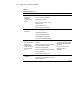
Was any functionality gained or diminished? Observe functionality changes to judge the
effectiveness of the action plan.
Were any errors made in implementing the step?
Was more than one variable changed at a time?
Watch for and record any mistakes made while
executing the step or the action plan.
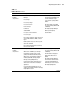
Were any steps skipped or completed out of order? Look out for skipped steps or steps executed out of
order. Circle the steps not executed and number
the true order of the steps executed.
Were any steps accidentally added? Were any
steps added intentionally to complete or correct
another step?
Place check marks against the steps as they are
executed to avoid this. If steps had to be added on
the fly to proceed, record why and indicate what
step they were added after.