
Compaq ProLiant ML350 Server General Troubleshooting Guide


Diagnosing the Problem 1-5
Compaq Confidential – Need to Know Required
Writer: Susana Weinstein Salazar Project: Compaq Servers Troubleshooting Guide Comments:
Part Number: 161434-001 File Name: b-ch1 Diagnosing the Problem.doc Last Saved On: 8/29/99 7:41 PM
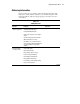
Table 1-1
Collect the Facts
continued
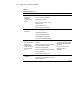
Question Examples Your Facts
What are the
hardware
components?
What is the system configuration:
Memory?
Processor(s)?
Processor speed(s)?
Processor location?
Cache memory?
Controllers?
Shadow RAM?
Free space on the hard drive?
Processor type?
Do you have information about components
such as IRQ, I/O address, DMA, connector
types?
Did the problem only occur after a specific
device was installed?
Do you have third-party devices that may
have caused a conflict?
Run the Inspect Utility. Boot the
system and press F10 when you
see the following message:
“Press F10 for system partition
utilities”
Run the Compaq Survey Utility
(for servers running Windows NT
or NetWare).
Run Compaq Insight Manager.
Gather your third-party
documentation.
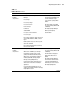
What are the
software
components?
What operating system version is installed?
What version of ROM are you running?
If applicable, what file system is used
(example for Windows NT: NTFS, FAT)?
What version of the diagnostic utilities is
installed (SSD, BIOS, Compaq Insight
Manager, Compaq Diagnostics)?
If the problem is with a particular device,
what version of the driver is installed, if
applicable?
Is the Compaq Insight Manager console
software version different than the Compaq
Insight Agents version?
Run the Compaq Survey Utility
(for servers running Windows NT
or NetWare).
This Information is displayed
during Power-On Self-Test
(POST).
Run Compaq Insight Manager.
Use the Version Control feature
of Compaq Insight Manager to
determine your server’s version.
Run Compaq Diagnostics.
continued