
Compaq ProLiant ML350 Server General Troubleshooting Guide


Diagnosing the Problem 1-3
Compaq Confidential – Need to Know Required
Writer: Susana Weinstein Salazar Project: Compaq Servers Troubleshooting Guide Comments:
Part Number: 161434-001 File Name: b-ch1 Diagnosing the Problem.doc Last Saved On: 8/29/99 7:41 PM
Gathering Information
If you encounter an error condition, gather the following information first.
Having these details available will reduce your troubleshooting time. This
information will also help the Compaq support person diagnose and solve
your problem.
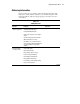
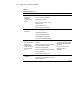
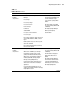
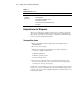
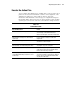
Table 1-1
Collect the Facts
Question Examples Your Facts
Did you check for
“obvious” problems?
Is the server power cord plugged into a
working grounded AC outlet?
Is the On/Standby button On?
Are there unconnected or loose plugs or
cables?
Are any external cables disconnected?
What is attached to the server?
Are switches set correctly? Check your
server-specific troubleshooting guide and
user documentation to verify switch
settings.
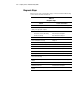
What visual/audio
cues do you have?
Are the LEDs on/off?
Are the fans spinning?
Does anything “appear” wrong?
Is there any physical damage?
Does anything sound different?
Does anything sound wrong?
Is something cool that should be warm?
Do you see frayed cables?
continued