
Compaq ProLiant Clusters for SCO UnixWare 7 U/200 Quick Install Guide for the Compaq ProLiant ML350



5-6 Compaq ProLiant Clusters for SCO UnixWare 7 U/200 Quick Install Guide for the Compaq ProLiant ML350
Compaq Confidential – Need to Know Required
Writer: Rachel Williams Project: Compaq ProLiant Clusters for SCO UnixWare 7 U/200 Quick Install Guide for the Compaq ProLiant ML350
Comments: Part Number: 223094-001 File Name: f-ch5 Troubleshooting.doc Last Saved On: 12/27/00 10:32 AM
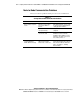
Client-to-Cluster Connectivity Problems
This section addresses problems relating to client-to-cluster connectivity.
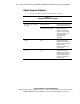
Table 5-4
Solving Client-to-Cluster Connectivity Problems
Problem Possible Cause Action
Improper name resolution Verify that the /etc/resolv.conf
file within the cluster indicates
the correct domain name
servers. Verify that the domain
name system (DNS) is properly
configured.
No network connectivity Verify network cabling
connections.
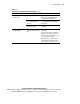
Transmission Control
Protocol/Internet Protocol
(TCP/IP) is not properly
configured
Configure TCP/IP using
SCOadmin networking tools.
Clients cannot communicate
with a node (or nodes) over
Ethernet
Public network interface IP
address is invalid
Reconfigure public network
interface IP addresses for the
network boards within the
cluster using SCOadmin
networking tools.
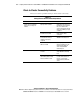
Cluster Virtual IP (CVIP) address
is invalid
Reconfigure the CVIP address
using SCOadmin networking
tools.
Clients do not see the cluster
CVIP address is not on the same
subnet with a public network
interface within the cluster
Make sure that the CVIP address
is on the same subnet as at
least one or more public
network interfaces within the
cluster.
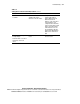
continued