
Compaq ProLiant Clusters for SCO UnixWare 7 U/200 Quick Install Guide for the Compaq ProLiant ML350



Troubleshooting 5-5
Compaq Confidential – Need to Know Required
Writer: Rachel Williams Project: Compaq ProLiant Clusters for SCO UnixWare 7 U/200 Quick Install Guide for the Compaq ProLiant ML350
Comments: Part Number: 223094-001 File Name: f-ch5 Troubleshooting.doc Last Saved On: 12/27/00 10:32 AM
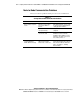
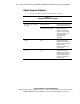
Table 5-3
Solving Node-to-Node Communication Problems
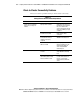
continued
Problem Possible Cause Action
Node hardware failure Disconnect the node from the cluster.
Diagnose and repair hardware failures
as a stand-alone ProLiant server.
Ethernet crossover cable is
not correctly cabled or is
defective
Verify that the Ethernet crossover cable
is connected as described in Chapter 2
of this guide.
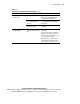
Existing node does not
rejoin the cluster
Embedded NIC is not
correctly functioning
Verify that the embedded NIC is correctly
configured.
Both potential root nodes
act independently
Ethernet connection failed
(and the CI serial cable is not
used)
Determine which node has the most
current data.
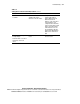
Power down the cluster. Verify that the
Ethernet crossover cable is properly
connected, is not crimped, and so on. If
necessary, replace the cable.
When the repair is complete, boot the
node with the most current data. (The
data on this node is now preserved.)