
Compaq ProLiant Clusters for SCO UnixWare 7 U/200 Quick Install Guide for the Compaq ProLiant ML350


5-4 Compaq ProLiant Clusters for SCO UnixWare 7 U/200 Quick Install Guide for the Compaq ProLiant ML350
Compaq Confidential – Need to Know Required
Writer: Rachel Williams Project: Compaq ProLiant Clusters for SCO UnixWare 7 U/200 Quick Install Guide for the Compaq ProLiant ML350
Comments: Part Number: 223094-001 File Name: f-ch5 Troubleshooting.doc Last Saved On: 12/27/00 10:32 AM
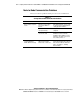
Node-to-Node Communication Problems
This section addresses problems relating to node-to-node communication.
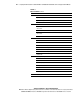
Table 5-3
Solving Node-to-Node Communication Problems
Problem Possible Cause Action
Ethernet crossover cable is
not correctly cabled or is
defective
Verify that the Ethernet crossover cable
is connected as described in Chapter 2,
“Setting Up Cluster Hardware.”
Embedded NIC is not
correctly functioning
Verify that the embedded NIC is correctly
configured.
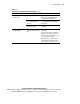
New node does not join the
cluster
UnixWare 7 licenses are not
correct for the node
Verify that you have the proper
UnixWare 7 licenses on the node,
including the base UnixWare 7 license
and licenses for number of processors,
users, features, and so on.
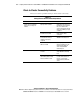
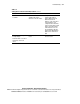
Node 2 does not join the
cluster and displays a
FATAL: SBA Error message
Ethernet interconnect
addresses do not match
between node 1 and node 2.
Boot node 2 with the Quick Install CD,
perform the installation steps, and enter
interconnection addresses that match
node 1. See Chapter 3, “Installing
Cluster Software.”
continued