
Compaq ProLiant Clusters for SCO UnixWare 7 U/200 Quick Install Guide for the Compaq ProLiant ML350
2-4 Compaq ProLiant Clusters for SCO UnixWare 7 U/200 Quick Install Guide for the Compaq ProLiant ML350
Compaq Confidential – Need to Know Required
Writer: Rachel Williams Project: Compaq ProLiant Clusters for SCO UnixWare 7 U/200 Quick Install Guide for the Compaq ProLiant ML350
Comments: Part Number: 223094-001 File Name: c-ch2 Setting Up Cluster Hardware.doc Last Saved On: 12/27/00 10:30 AM
Cabling the Ethernet Interconnect
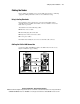
To cable the Ethernet interconnect, connect one end of the Ethernet crossover
cable to the embedded NIC in node 1. Connect the other end of the Ethernet
crossover cable to the embedded NIC in node 2. Figure 2-1 illustrates proper
cabling.
Cabling the CI Serial Cable
To cable the CI serial cable, connect one end of the CI serial cable to serial
port connector B in node 1. Connect the other end of the CI serial cable to
serial port connector B in node 2. Figure 2-1 illustrates proper cabling.
Cabling the Keyboard, Monitor, and Mouse
To cable the keyboard, monitor, and mouse, refer to the documentation that
comes with these components.
UPS Power Management Cabling
Compaq ProLiant Clusters for SCO UnixWare 7 support serial data
connections from UPS units to ProLiant server nodes in the cluster. This
feature provides the cluster with soft shutdown capability when an AC power
outage lasts until the uninterruptible power supply (UPS) batteries approach
the end of their holdup period.
To connect the UPS power management cable to the ProLiant server nodes:
1. Locate the cable. The UPS power management cable is a 3.66-m
(12.00-ft) serial cable included with most Compaq UPSs.
2. Connect one end of the cable to the COM port on the UPS chassis.
Connect the other end of the cable to any unused serial port on any
ProLiant server within the cluster. Because the power management
software is cluster-aware, you can connect the UPS power management
cable to any node in the cluster.
If a second UPS is used, repeat step 2. Connect the UPS serial cable to the
other server. Do not connect multiple cables to one server.