
Compaq ProLiant Clusters for SCO UnixWare 7 U/200 Quick Install Guide for the Compaq ProLiant ML350

Setting Up Cluster Hardware 2-3
Compaq Confidential – Need to Know Required
Writer: Rachel Williams Project: Compaq ProLiant Clusters for SCO UnixWare 7 U/200 Quick Install Guide for the Compaq ProLiant ML350
Comments: Part Number: 223094-001 File Name: c-ch2 Setting Up Cluster Hardware.doc Last Saved On: 12/27/00 10:30 AM
Cabling the Nodes
Proper cabling can simplify service and assembly of the cluster, so following
appropriate cabling standards is vital to a successful cluster setup.
Using Labeling Standards
Proper labeling can prevent improper connections and simplify cluster
assembly and service. Make sure to label each server with the correct node
labels that are provided.
Also label the ends of the following cables:
■ Ethernet crossover cable
■ Cluster Integrity (CI) serial cable
■ Keyboard, monitor, and mouse cables
■ Server power cables
Each label must identify the server node to which the cable connects.
Cabling the Public LAN Connection
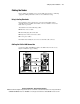
Connect the public LAN Ethernet cable to the NIC in slot 4 of the servers.
Figure 2-1 illustrates proper cabling.
Node 1 Node 2
CI Serial Cable
Ethernet Crossover
Cable
To Public
Network
Figure 2-1. Cabling the cluster