
Compaq ProLiant Clusters for SCO UnixWare 7 U/200 Quick Install Guide for the Compaq ProLiant ML350

Clustering Overview 1-5
Compaq Confidential – Need to Know Required
Writer: Rachel Williams Project: Compaq ProLiant Clusters for SCO UnixWare 7 U/200 Quick Install Guide for the Compaq ProLiant ML350
Comments: Part Number: 223094-001 File Name: b-ch1 Clustering Overview.doc Last Saved On: 12/29/00 9:32 AM
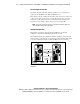
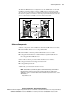
The ProLiant ML350 cluster configuration uses the CNM feature of the SCO
UnixWare 7 NonStop Clusters software. CNM replicates data between disk
drives in the two nodes. Figure 1-2 illustrates the mirrored internal disk drives.
Because the replicated, or mirrored, data is kept synchronized between the two
servers, current data is available even if one of the nodes fails.
Mirror
To Public
Network
Node 1 Node 2
CI Serial Cable
Ethernet Crossover
Cable
Figure 1-2. Reliable storage configuration in clusters using CNM
Software Components
Software components of the U/200 kit for the ProLiant ML350 server include:
■ SCO UnixWare Release 7.1.1 Compact Media Kit
■ SCO UnixWare 7 NonStop Clusters Media Kit Version 7.1.1+IP
■ Compaq ProLiant Clusters for SCO UnixWare 7 Quick Install CDs for
the Compaq ProLiant ML350 server
Cluster-related software provided with the ProLiant server includes:
■ Compaq SmartStart™ and Support Software CD
■ Compaq Management CD
Additionally, you must obtain software licenses.
NOTE: SCO UnixWare 7 (with Mirroring Option or Online Data Manager) and UnixWare 7
NonStop Clusters software licenses must be purchased through your SCO reseller or
distributor. To locate a convenient SCO reseller or distributor to purchase licenses, see the
SCO website at
http://www.sco.com