
Compaq ProLiant Clusters for SCO UnixWare 7 U/200 Quick Install Guide for the Compaq ProLiant ML350

1-4 Compaq ProLiant Clusters for SCO UnixWare 7 U/200 Quick Install Guide for the Compaq ProLiant ML350
Compaq Confidential – Need to Know Required
Writer: Rachel Williams Project: Compaq ProLiant Clusters for SCO UnixWare 7 U/200 Quick Install Guide for the Compaq ProLiant ML350
Comments: Part Number: 223094-001 File Name: b-ch1 Clustering Overview.doc Last Saved On: 12/29/00 9:32 AM
Cluster Integrity Serial Cable
The Cluster Integrity (CI) serial cable listed with the server components is
required for the U/200 kit for the ProLiant ML350 server.
This cable prevents the condition in which more than one node in a cluster acts
as the root node and operates as the root node. Because the active root node
mounts the root file system and runs several critical cluster-wide functions,
more than one node trying to behave as the root node is undesirable.
NOTE: The CI serial cable may be referred to as the split-brain avoidance (SBA) serial
cable in UnixWare software and documentation.
Hardware Configuration
The hardware components supported by the U/200 kit are specifically
configured so that software installation takes about one hour.
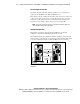
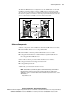
The U/200 kit supports the configuration illustrated in Figure 1-1. A CI serial
cable is required, connecting the servers through serial port B. For public LAN
access, this configuration requires an NC3123 NIC in slot 4 of each node.
Node 1 Node 2
CI Serial Cable
Ethernet Crossover
Cable
To Public
Network
Figure 1-1. Hardware components of the ProLiant ML350 server CNM
configuration