
Compaq ProLiant Clusters for SCO UnixWare 7 U/200 Quick Install Guide for the Compaq ProLiant ML350
Clustering Overview 1-3
Compaq Confidential – Need to Know Required
Writer: Rachel Williams Project: Compaq ProLiant Clusters for SCO UnixWare 7 U/200 Quick Install Guide for the Compaq ProLiant ML350
Comments: Part Number: 223094-001 File Name: b-ch1 Clustering Overview.doc Last Saved On: 12/29/00 9:32 AM
Servers
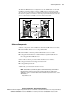
The ProLiant ML350 servers must contain one 9.1-GB disk drive in each node
and an embedded NIC to use for the cluster interconnect. To connect to a
public LAN, the server requires an NC3123 NIC installed in slot 4. A serial
cable connecting the two nodes using serial port B is also required.
LAN Connection
An NC3123 NIC must be installed into slot 4 of each server before cluster
installation to enable the cluster to access a public LAN. These NICs must be
on a different subnet from that of the embedded Ethernet cluster interconnect.
Multiple public LAN controllers can be installed after cluster installation is
complete. For a list of certified NICs, see the Compaq High Availability
website at
http://www.compaq.com/highavailability
Cluster Interconnect
A dedicated, private Ethernet network connects the servers of a U/200 cluster
kit. The Ethernet cluster interconnect uses the embedded NICs in slot 1 and an
Ethernet crossover cable to connect the two nodes.
The cluster nodes use the interconnect data path to support the single-system
image capabilities of the cluster, including:
■ Cross-node mirroring
■ Cluster-wide file system
■ Cluster-wide process management, migration, and load balancing
■ Cluster-wide networking and Cluster Virtual IP (CVIP)
■ Cluster-wide system administration and management
The Ethernet crossover cable provides the node-to-node communication data
path for the cluster.