
HP ProLiant ML350 G6 Servers graphics card power cable kit Installation instructions

Installing the power adapter cable
Before installing a high-power graphics card, install the cable.
To install the component:
1. Power down the server.
2. Do one of the following:
o Open or remove the tower bezel, as needed.
o Extend the server from the rack.
3. Remove the access panel.
4. Disconnect all cables connected to the system board.
5. Remove all expansion boards.
6. Remove the large redundant fan air baffle, if installed.
7. Remove the DIMM baffles.
8. Remove all fans.
9. Loosen the two system board thumbscrews.
10. Using the system board tray handles, slide the tray forward
and remove the system board.
For this procedure, removing the processors, heatsinks, DIMMs,
and cache module from the system board is not required.
11. Connect the 10-pin connector on the PCIe power cable to the
power supply backplane. Be sure to thread the cable through
the center wall.
12. Install the system board.
13. Tighten the thumbscrews.
14. Connect all cables to the system board.
15. Install all fans.
16. Install all DIMM baffles.
17. Install the large redundant fan air baffle, if removed.
18. Install all expansion boards.
19. Connect the PCIe power cable to an installed PCIe expansion
board, as needed.
20. Install the access panel.
21. Do one of the following:
o Install and lock the bezel.
o Slide the server back into the rack.
22. Power up the server.
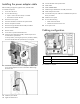
Cabling configuration
Item Description
1 2x5-pin connector
2 75-W 2x3-pin power connector
The installation is complete.