
HP ProLiant ML350 G6 Server User Guide

Hardware options installation 60
3.
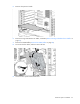
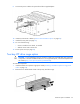
Using a T-15 Torx screwdriver, remove the primary hard drive cage screws.
4. Extend the primary hard drive cage from the chassis.
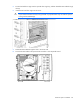
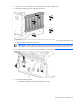
5. Disconnect the existing SAS cable from the connector B (labeled "4 and 5") on the primary drive cage
backplane. Retain the cable for future use.
IMPORTANT: When installing the optional two-bay LFF expansion hard drive cage, the existing
SAS cable B on the primary drive will be replaced by the mini-SAS Y-cable from the option kit.
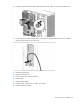
6. Connect the following cables:
o The sideband LED cable to the optional hard drive cage