
HP ProLiant ML350 Generation 4p Server Maintenance and Service Guide

Removal and replacement procedures 17
2.
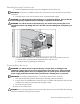
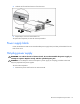
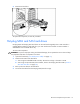
Push down on the power supply release latch, and remove the power supply from the server.
CAUTION: To prevent improper cooling and thermal damage, do not operate the server unless all bays
are populated with either a component or a blank.
To replace the component, reverse the removal procedure.
Hot-plug power supply backplane
To remove the component:
1. Power down the server ("Powering down the server" on page 13).
2. Remove the power supplies from the server ("Hot-plug power supply" on page 16).
3. Remove the access panel ("Access panel" on page 14).
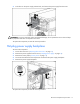
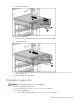
4. Disconnect the cables from the components connected to the power supply backplane.
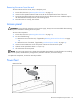
5. Remove the power supply backplane.
To replace the component, reverse the removal procedure.