
Microsoft®Windows® Small Business Server 2008 Getting Started



Getting started 4
Getting started
Connecting your server to the network
Before you begin you must have the following items:
o Product key
o Router with firewall capability
o Network cables
This copy of Windows® Small Business Server (SBS) 2008 comes with two product keys. The virtual key
works in virtual operating system environments. For more information about using your virtualization
product keys, see the Microsoft® website (http://go.microsoft.com/fwlink/?LinkID=117792
).
To plan your installation, see the Microsoft® website
(http://go.microsoft.com/fwlink/?LinkID=106133
).
To connect your server to the network:
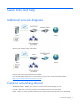
1. Plug one end of a network cable into the network adapter on your server and the other end into the
internal (local) interface on your router.
IMPORTANT: Ensure that you have a link light on the network card for the entire installation.
The network cable must remain connected.
2. Verify that your network hardware (such as your router) is powered on and is properly connected to
the Internet.
Customizing the software
1. If your server already has Windows® Small Business Server 2008 installed on it, turn on your
server.
Your server initializes, which takes several minutes. During this time, do not turn off your server.