
Advanced memory protection for HP ProLiant 300 series G4 servers
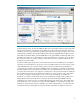
Online Spare mode does not require operating system support. It can be enabled and function
properly with any operating system. In addition, no special software beyond the System BIOS is
required for the proper function of Online Spare mode. However, if messaging and logging are
desired at the console along with messages in Insight Manager, an operating system must be used
that has system management and agent support for AMP. On ProLiant 300-series G4 servers, these
operating systems include:
• Microsoft® Windows® 2000 Server
• Microsoft Windows 2000 Advanced Server
• Microsoft Windows 2003 Server
• Microsoft Windows 2003 Enterprise Server
• Linux
• Novell NetWare 6.x
Managing failures in a system with online spare enabled
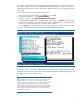
When the correctable error threshold is exceeded for a DIMM with Online Spare enabled, the system
will copy the contents of the failing bank to the online spare bank. The health driver will log a
message to the console and to the event log indicating that a threshold has been exceeded and a
copy has been initiated. If the agents are loaded, System Insight Manager will indicate the memory is
in a degraded state. In addition, the following LEDs will indicate that the error has occurred:
• The internal health LED will indicate caution.
• The LED next to the DIMM exceeding the correctable error threshold will illuminate amber.
• The Online Spare Status LED will illuminate amber, indicating an online spare copy has been
initiated.
After the copy is completed, the failing bank will be deactivated and the Online Spare bank will
become active. The health driver will log a message to the console and to the event log to indicate
that the copy is complete.
8