
Advanced memory protection for HP ProLiant 300 series G4 servers

• On systems that support DDRI DIMMs, dual-rank DIMMs must be populated after single-rank
DIMMs.
• The last bank populated is the Online Spare bank.
• The Online Spare bank must have equal or larger capacity DIMMs to all other DIMMs in the
system. See “Note,” below.
Note
This simple rule is true with HP Memory Option kits. For third party
memory, the true requirement is that the Online Spare bank must have
greater than or equal to the amount of memory in each rank of the Online
Spare bank. If a dual-rank Online Spare bank is used, and another bank in
the system is populated with single-rank DIMMs, each rank of the Online
Spare bank must be at least as large as the rank in the single-rank DIMM.
To simplify, if single and dual-rank DIMMs are mixed in a system, Online
Spare can only be supported if the Online Spare bank is at least twice as
large as the bank with single-rank DIMMs. HP Memory Option kits are
configured such the previous simple rule can be followed.
• The system will attempt to boot in Online Spare with every reboot and will downgrade to Advanced
ECC if the configuration rules are not met.
Configuring the AMP mode
Configuring the AMP mode requires very little work once the user determines the desired mode. The
desired AMP mode is selected via ROM-Based Setup Utility (RBSU). It is recommended that the
system’s DIMM configuration be set up properly to support the desired AMP mode prior to running
RBSU to enable the desired AMP mode.
Also, it is highly recommended that the memory test is run with the system configured for Advanced
ECC once the memory is added to the system. This helps to verify that the memory in the online spare
bank has been tested and is working properly. The spare memory is not fully tested again after the
system is configured for Online Spare and will not be utilized until the switchover occurs between the
primary bank and the designated spare bank. With ProLiant 300-series G4 platforms, a very basic
verification of the Online Spare bank is periodically run during normal operation. However, it is still
recommended that a more thorough test be ran on the spare bank prior to configuring the system for
Online Spare Mode. The POST memory test can be used for this purpose.
The POST memory test will automatically be executed in POST anytime the memory configuration is
changed. When memory is replaced with DIMMs of the same capacity, a memory configuration
change will not be detected, so the user should follow the following steps to manually test the
memory:
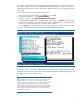
1. Under Advanced Options in RBSU, change the setting POST Speed Up to disable (enabled by
default.)
2. Make sure that the selected AMP Mode is Advanced ECC (this is the default). This option is also in
RBSU under Advanced Options and Advanced Memory Protection.
3. Reboot. All the memory will be tested. This may take a few minutes, depending on how much
memory is installed in your system. Once the memory has been tested, you can enable POST Speed
Up again for faster system boot.
Another option for verifying the Online Spare bank is to run the ROM-based Diagnostics Memory Test
when the system is configured for Advanced ECC Mode. The ROM-based Diagnostics Memory Test is
entered via entering the System Maintenance menu at the end of POST (enter the System
Management menu by pressing the F10 key at the prompt late in POST). Using this memory test
6