
ProLiant ML350 Generation 3 Server Setup and Installation Guide
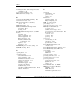
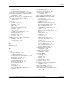
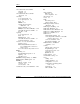
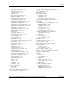


Index
removal 3-46
rack planning resources 2-3
socket location, illustrated 3-35
rack server, specifications F-4
preboot execution environment See PXE
radio frequency interference,
correcting A-3
preconfigured operating system, installation
instructions 2-30
rails, component installation 2-14
problems, diagnosing See troubleshooting
RBSU (ROM Based Setup Utility)
processor hyperthreading, enable or
disable 5-8
accessing 5-2
Advanced Options menu 5-7
processors
ASR menu 5-5
error message C-1
BIOS Serial Console menu 5-8
installing 3-34
Boot Controller Order menu 5-5
LEDs E-6
Date and Time menu 5-5
minimum requirements F-5
establishing security with 1-17
removing 3-42
features 1-16
server 1-13
IPL Device Boot Order menu 5-4
socket location, illustrated 3-35
keys 5-2
thermal problem C-1
menus, listed 5-3
troubleshooting D-7
navigation 5-2
warranty 1-15
overview 5-2
PXE (preboot execution environment)
PCI Devices menu 5-4
enabling 1-14, 5-4
remote booting, PXE 1-14
server features 1-16
saving 5-2
Server Asset Text menu 5-6
server configuration 2-33
Q
Server Passwords menu 5-5
Quicklock 5-6
System Options menu 5-3
redundant power supply bay,
identifying 3-50
R
redundant power supply,
rack
installation 3-50
Compaq branded 2-10
redundant ROM
cooling requirements 2-3
accessing 5-8
environmental recommendations 2-10
benefits 5-8
installation overview 2-12
defined 5-8
mounting hardware 2-7
switch settings E-13
ordering requirements 2-3
registration, server 2-34
physical specifications 2-3
Regulatory Compliance Identification
Numbers A-1
power requirements 2-3
resources 2-3
remote boot, PXE 1-14, 5-4
site planning 2-3
remote server features 5-11
video, Installing Rack Products 2-3
removable media bay, installing device
into 3-15
warnings 2-4
HP ProLiant ML350 Generation 3 Server Setup and Installation Guide Index-7
COMPAQ CONFIDENTIAL
Writer: Richard O. Heath File Name: x-index.doc
Codename: Steel Venom Part Number: 316354-002 Last Saved On: 8/21/03 10:30 AM