
ProLiant ML350 Generation 3 Server Setup and Installation Guide

LED Indicators, Switches, and Jumpers
System Status LEDs
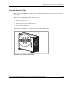
The system status LEDs and the Power On/Standby button are located on the front of
the server.
The Power On/Standby button allows you to:
•
•
•
Power up the server.
Place the server in standby mode.
Power down the server.
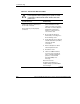
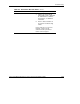
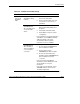
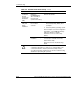
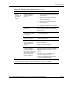
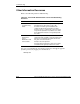
Figure E-1 and Table E-1 explains each possible LED status.
1 2 3
4 5
Figure E-1: System status LEDs
HP ProLiant ML350 Generation 3 Server Setup and Installation Guide E-3
HP CONFIDENTIAL
Writer: Richard O. Heath File Name: k-appe LED Indicators, Switches, and Jumpers.doc
Codename: Steel Venom Part Number: 316354-002 Last Saved On: 8/21/03 10:27 AM