
HP ProLiant ML350 Generation 3 Server Maintenance and Service Guide

Removal and Replacement Procedures
6. Remove all drive blanks and hard drives. Refer to “Hot-Plug Hard Drive Blank” and
“Hot-Plug Hard Drive” earlier in this chapter.
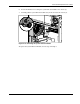
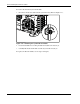
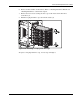
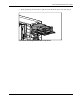
7. Remove the four screws securing the drive cage to the chassis with a Torx T-15
screwdriver (1).
8. Pull the hot-plug hard drive cage out from the chassis (2).
2
1
1
1
Figure 2-20: Removing a hot-plug hard drive cage
To replace a hot-plug hard drive cage, reverse steps 2 through 8.
HP ProLiant ML350 Generation 3 Server Maintenance and Service Guide 2-23