
HP ProLiant ML350 Generation 3 Server Maintenance and Service Guide

Removal and Replacement Procedures
Hot-Plug Hard Drive Cage
To remove a hot-plug hard drive cage:
1. Complete the preparation procedures. Refer to “Preparation Procedures” earlier in this
chapter.
2. Remove the bezel door. Refer to “Bezel Door (Tower Model Only)” earlier in this
chapter.
3. Remove the access panel. Refer to “Access Panel” earlier in this chapter.
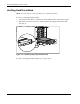
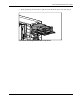
4. Disconnect the power cable from the back of the hot-plug hard drive cage (1).
5. Disconnect the SCSI cable from the back of the hot-plug hard drive cage and system
board (2).
1
2
2
Figure 2-19: Disconnecting cables from the hot-plug hard drive
cage
2-22 HP ProLiant ML350 Generation 3 Server Maintenance and Service Guide