
Compaq ProLiant ML350 Generation 2 Server Setup and Installation Guide

LED Indicators, Switches, and Jumpers E-7
Compaq Confidential – Need to Know Required
Writer: Jennifer Hayward Project: Compaq ProLiant ML350 Generation 2 Server Setup and Installation Guide Comments:
Part Number: 236843-002 File Name: k-appe LEDs & Switches.doc Last Saved On: 9/4/01 11:16 AM
Network Controller LEDs
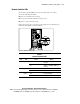
The network controller LEDs are located on the back of the server. They
provide the following information:
■ If the server is linked to the network
■ The speed at which the network is being accessed
■ If there is current network activity
Refer to the Compaq Servers Troubleshooting Guide for more information on
troubleshooting network controller problems.
1
2
3
Figure E-3. Network controller LEDs
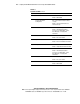
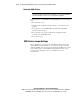
Table E-3
Network Controller LEDs
Item LED Status Means
Off 10Base-T 10-Mbps (10Base-T
Ethernet)
Speed
On 100Base-T 100-Mbps (100Base-T
Ethernet)
Off No network link Link
On Linked to network
Off No network activity Activity
On or flashing Network activity