
Compaq ProLiant ML350 Generation 2 Server Setup and Installation Guide

E-6 Compaq ProLiant ML350 Generation 2 Server Setup and Installation Guide
Compaq Confidential – Need to Know Required
Writer: Jennifer Hayward Project: Compaq ProLiant ML350 Generation 2 Server Setup and Installation Guide Comments:
Part Number: 236843-002 File Name: k-appe LEDs & Switches.doc Last Saved On: 9/4/01 11:16 AM
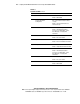
Table E-2
System Board LEDs
continued
Item LED Description Status
PPM 2 status Off = PPM 2 functioning
Amber = PPM 2 failed
Server Feature Board
Seating status
Off = Server Feature Board is installed
correctly
Amber = Server Feature Board is not
installed correctly
Processor 2 thermal Off = Processor 2 temperature normal
Amber = Thermal trip detected for
processor 2. See Appendix C, “Server
Error Messages,” for appropriate
instructions.
Processor 2 status Off = Processor 2 functioning
Amber = Processor 2 failed
System Fan status Off = Fan is functioning
Amber = Fan is not installed or has failed
Temperature threshold Off = Normal
Amber = Temperature threshold exceeded
Processor 1 thermal Off = Normal
Amber = Thermal trip detected for
processor 1. See Appendix C, “Server
Error Messages,” for appropriate
instructions.
Processor 1 status Off = Processor 1 functioning
Amber = Processor 1 failed
PPM 1 status Off = PPM 1 functioning
Amber = PPM 1 failed