
Compaq ProLiant ML350 Generation 2 Server Setup and Installation Guide

LED Indicators, Switches, and Jumpers E-5
Compaq Confidential – Need to Know Required
Writer: Jennifer Hayward Project: Compaq ProLiant ML350 Generation 2 Server Setup and Installation Guide Comments:
Part Number: 236843-002 File Name: k-appe LEDs & Switches.doc Last Saved On: 9/4/01 11:16 AM
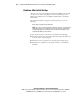
System Board LEDs
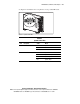
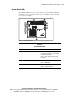
The following LEDs are located on the system board of the ProLiant ML350
Generation 2 server and indicate when a processor, PPM, or memory module
has experienced a failure.
1
2
3
4
5
6
7
8
9
10
11
12
Figure E-2. System Board LEDs
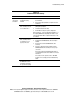
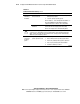
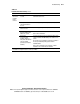
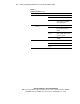
Table E-2
System Board LEDs
Item LED Description Status
AC power Off = No AC power, poor power supply,
power supply in standby, or power supply
exceeded current limits
Green = Power supply is turned on and
functioning
DIMM status Off = DIMM functioning
Amber = DIMM failed
Fan 2 status Off = Normal (system in standby mode)
Amber = System degraded
continued