
Compaq ProLiant ML350 Generation 2 Server Setup and Installation Guide
E-2 Compaq ProLiant ML350 Generation 2 Server Setup and Installation Guide
Compaq Confidential – Need to Know Required
Writer: Jennifer Hayward Project: Compaq ProLiant ML350 Generation 2 Server Setup and Installation Guide Comments:
Part Number: 236843-002 File Name: k-appe LEDs & Switches.doc Last Saved On: 9/4/01 11:16 AM
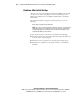
LEDs
A variety of status LEDs are located on the front and back of your server.
These LEDs aid you in diagnosing problems by communicating the status of
the components and operations of the server. The following ProLiant ML350
Generation 2 server LEDs are explained in this appendix.
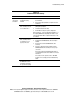
■ System status LEDs (on the front of the server)
! Power On/Standby and AC power status
! Network Interface Controller (NIC) activity
! Internal health
! External health
! Unit ID
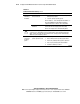
■ System board LEDs
! Processor failure
! PPM failure
! Memory failure
! Thermal failure
! Fan failure
! Server Feature Board seating failure
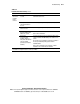
■ Network controller LEDs (on the back of the server)
! Network activity status
! Network link
! Connection speed
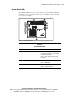
System Status LEDs
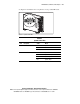
The system status LEDs and the power button are located on the front of the
server.
The power button allows you to:
■ Power up the server
■ Place the server in standby mode
■ Power down the server