
Compaq ProLiant ML350 Generation 2 Server Setup and Installation Guide

Troubleshooting D-11
Compaq Confidential – Need to Know Required
Writer: Jennifer Hayward Project: Compaq ProLiant ML350 Generation 2 Server Setup and Installation Guide Comments:
Part Number: 236843-002 File Name: j-appd Troubleshooting.doc Last Saved On: 9/5/01 9:18 AM
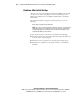
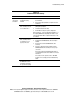
Table D-4
Problems After Initial Startup
continued
Problem Possible Cause Possible Solution
Server
cannot load
operating
system.
continued
Installation problem
occurred.
Refer to your operating system documentation and to the
SmartStart release notes.
Primary hard drive
controller installation is
incorrect.
Run RBSU by pressing the F9 key to correct this problem.
Hard drive controller
order is incorrect.
Run RBSU by pressing the F9 key to correct this problem.
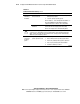
Encountered problem
after new hardware was
added to the system.
Refer to the documentation provided with the hardware.
Remove the new hardware.
Problem was
encountered with
hardware added to a
new system ordered with
a factory-installed
operating system (where
available).
You must complete the factory-installed operating system
software installation BEFORE adding new hardware to the
system.
Be sure that you are following the instructions provided in
the Factory-Installed Operating System Software
Installation Guide.
Remove the new hardware and complete the software
installation. Then, reinstall the new hardware.
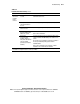
Note: Refer to Chapter 5, “Server Configuration and Utilities,” or the Compaq ROM Based Setup Utility
User Guide for complete instructions on the use of RBSU.