
Compaq ProLiant ML350 Generation 2 Server Setup and Installation Guide

Troubleshooting D-9
Compaq Confidential – Need to Know Required
Writer: Jennifer Hayward Project: Compaq ProLiant ML350 Generation 2 Server Setup and Installation Guide Comments:
Part Number: 236843-002 File Name: j-appd Troubleshooting.doc Last Saved On: 9/5/01 9:18 AM
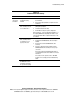
Table D-4
Problems After Initial Startup
Problem Possible Cause Possible Solution
System
cannot load
SmartStart.
Wrong version of
SmartStart is being
installed.
1. Check the SmartStart release notes and user
documentation.
2. Refer to the Compaq website to verify the version of
SmartStart
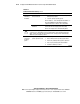
The CD-ROM/diskette
drive assembly is not set
as a bootable device.
1. Press the F9 key to run the ROM Based Setup Utility
(RBSU) when prompted.
2. Set defaults and exit the utility.
3. Rerun RBSU to verify the system configuration.
Refer to Chapter 5, “Server Configuration and Utilities,” or
the Compaq ROM Based Setup Utility User Guide on your
server documentation CD for complete instructions on the
use of RBSU.
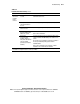
The CD-ROM/diskette
drive assembly is either
not installed, or is not
properly connected.
1. Power down the server.
2. Verify that the CD-ROM/diskette drive assembly is
installed.
3. Remove and reseat the CD-ROM/diskette drive
assembly.
4. Check the cable between the backplane and the
CD-ROM/diskette drive assembly to ensure proper
connection.
Refer to the Compaq ProLiant ML350 Generation 2
Server Maintenance and Service Guide for connection
information.
If the cable is not the problem, refer to “CD-ROM
Problems” in the Compaq Servers Troubleshooting
Guide.
Diskette in
CD-ROM/diskette drive
assembly is preventing
the system from loading.
Remove the diskette.
continued