
Compaq ProLiant ML350 Generation 2 Server Setup and Installation Guide

D-6 Compaq ProLiant ML350 Generation 2 Server Setup and Installation Guide
Compaq Confidential – Need to Know Required
Writer: Jennifer Hayward Project: Compaq ProLiant ML350 Generation 2 Server Setup and Installation Guide Comments:
Part Number: 236843-002 File Name: j-appd Troubleshooting.doc Last Saved On: 9/5/01 9:18 AM
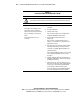
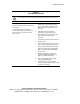
Table D-2
Front Panel Power-On/Standby LED Is Not On
See “LEDs” for a complete description of system status LEDs.
WARNING: To reduce the risk of electric shock or damage to the equipment, before opening
access panels to reseat components, power down the server and disconnect the power cord.
Possible Reasons The Next Step
There is no AC power connection.
Power button was not firmly pressed.
Power button connector cable is not
properly connected to the system board.
Processor has failed or is not properly
seated.
Power supply has failed or is not
connected.
1. Check the power cables. Make sure that they are fully
connected.
2. Press the power button.
3. Check the power source.
Refer to “Power Problems” in the Compaq Servers
Troubleshooting Guide for further options.
4. Reconnect the power button cable to the
system board.
Refer to section “System Board Components” in
Chapter 1, “Server Features,” for the location of the
power button connector.
5. Power down the server. Reseat all expansion boards,
and verify that all cables are securely connected.
See Chapter 3, “Hardware Options Installation,” for
complete instructions.
Refer to “General Hardware Problems” in the Compaq
Servers Troubleshooting Guide for tips on proper
procedures.
6. Check the diagnostic LEDs on the system board. See
Appendix E, “LED Indicators, Switches, and Jumpers”
for additional information.
7. If these steps do not correct the problem, the most
likely cause lies either in the power supply subsystem
or the processor. Contact your Compaq authorized
service provider for further technical support.
Refer to the Compaq Servers Troubleshooting Guide
for a list of Compaq authorized service providers.