
Compaq ProLiant ML350 Generation 2 Server Maintenance and Service Guide

Connectors, Switches and LEDs
Compaq ProLiant ML350 Generation 2 Server Maintenance and Service Guide 4-13
COMPAQ CONFIDENTIAL Codename: Forge Part Number: 236634-002 Last Saved On: 5/14/02 12:07 PM
Hot-Plug Hard Drive LEDs
This section provides the following information about hot-plug hard drive LEDs:
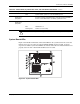
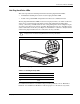
• An illustration detailing the location of each hot-plug hard drive LED
• A table of the possible LED configurations and what each combination means
The hot-plug SCSI hard drive LEDs, located on each physical drive, are visible on the front
of the server or external storage unit. They provide status information regarding drive
activity, connectivity, and fault status for each corresponding drive when configured as part
of an array and connected to an array controller. Their behavior may vary, depending on the
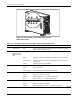
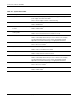
status of other drives in the array. Use Figure 4-7 with Tables 4-7 and 4-8 to analyze current
status for hot-plug hard drives that are connected to an array controller.
CAUTION: To avoid data loss, read “Hot-Plug Hard Drive Replacement Guidelines” in the
Compaq Servers Troubleshooting Guide before removing a hard drive.
1
2
3
Figure 4-7: Hot-plug hard drive LEDs
Table 4-7: Hot-Plug Activity LEDs:
Item LED Function
1 Activity
2 Online
3 Fault
For additional information on troubleshooting hard drive problems, refer to “Hard Drive
Problems” and “SCSI Device Problems” in the Compaq Servers Troubleshooting Guide.