
Compaq ProLiant ML350 Generation 2 Server Maintenance and Service Guide

Connectors, Switches and LEDs
4-12 Compaq ProLiant ML350 Generation 2 Server Maintenance and Service Guide
COMPAQ CONFIDENTIAL Codename: Forge Part Number: 236634-002 Last Saved On: 5/14/02 12:07 PM
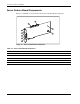
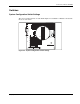
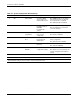
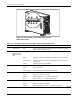
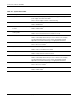
Table 4-6: System Board LEDs
Item Description Status
1 AC power Off = No AC power, poor power supply, power supply in standby, or
power supply exceeded current limits
Green = Power supply is turned on and functioning
2 DIMM status Off = DIMM functioning
Amber = DIMM failed
3 Processor Power Module (PPM)
2 status
Off = PPM 2 functioning
Amber = PPM 2 failed
4 Server Feature Board
seating status
Off = Server Feature Board is installed correctly
Amber = Server Feature Board is not installed correctly
5 Processor 2 thermal Off = Normal
Amber = Thermal trip detected for processor 2. Refer to the Compaq
ProLiant ML350 Generation 2 Server Setup and Installation Guide,
Appendix C, “Server Error Messages,” for appropriate instructions.
6 Processor 2 status Off = Processor 2 functioning
Green = Processor 2 failed
7 System fan status Off = Fan functioning
Amber = Fan is not installed or has failed
8 Temperature threshold Off = Normal
Amber = Temperature threshold exceeded
9 Processor 1 thermal Off = Normal
Amber = Thermal trip detected for processor 1. Refer to the Compaq
ProLiant ML350 Generation 2 Server Setup and Installation Guide,
Appendix C, “Server Error Messages,” for appropriate instructions.
10 Processor 1 status Off = Processor 1 functioning
Green = Processor 1 failed
11 PPM 1 status Off = PPM 1 functioning
Amber = PPM 1 failed