
Compaq ProLiant ML350 Generation 2 Server Maintenance and Service Guide

Connectors, Switches and LEDs
Compaq ProLiant ML350 Generation 2 Server Maintenance and Service Guide 4-11
COMPAQ CONFIDENTIAL Codename: Forge Part Number: 236634-002 Last Saved On: 5/14/02 12:07 PM
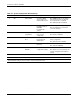
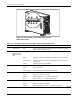
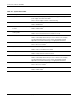
Table 4-5: Power Button, System Status LEDs, and Unit Identification Button continued
Item Description Status Description
Red System critical; system on or off with auxiliary power
6 Unit
Identification
(UID) button
N/A Allows the user to activate or deactivate unit identification. Pushing
the button activates unit identification, shown by the blue UID LED, so
that the onsite administrator can identify a particular server.
7 Unit
Identification
(UID) LED
Off Identification off
Blue Identification on
Flashing blue Remote console activity
CAUTION: When the power LED is green, it is unsafe to remove AC power from the system.
System Board LEDs
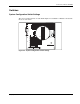
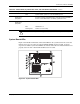
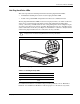
Figure 4-6 and Table 4-6 illustrate and describe LEDs on the system board of the server that
indicate when a processor, Processor Power Module (PPM), memory module, or fan has
experienced a failure. System board LEDs also indicate when the Server Feature Board is not
properly seated or when a thermal threshold has been exceeded.
2
1
3
4
6
5
8
7
10
9
11
Figure 4-6: System board LEDs