
Compaq ProLiant ML350 Generation 2 Server Maintenance and Service Guide

Connectors, Switches and LEDs
4-6 Compaq ProLiant ML350 Generation 2 Server Maintenance and Service Guide
COMPAQ CONFIDENTIAL Codename: Forge Part Number: 236634-002 Last Saved On: 5/14/02 12:07 PM
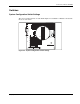
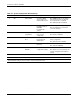
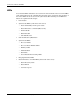
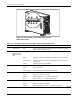
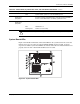
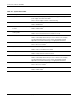
Table 4-4: System Configuration Switch Settings
Switch Default Position Function Description Settings
1 Off Video disable Used when ROM
does not detect an
installed video board
Off = ROM autodetects an optional
video board. If one is not detected,
then onboard video is enabled.
On = Onboard video is disabled.
2 Off Lock configuration Enables or disables
the ability to write to
NVRAM to
reconfigure the
system
Off = Configuration can be changed.
On = Configuration is locked and
cannot be changed.
3 Off Tower or rack
configuration
Used to specify a
tower or rack
configuration
Off = Tower configuration
On = Rack configuration
4 Off Enable diskette
boot
Enables or disables
booting from the
diskette drive
Off = Diskette drive boot is controlled
by the configuration.
On = Diskette boot is disabled.
5 Off Password disable Used to disable
password
Off = Password enabled
On = Password disabled
6 Off Clear CMOS and
NVRAM
Used to clear system
configuration settings
Off = Normal
On = When server is powered up, all
system configuration information is
erased.
7 Off Reserved N/A N/A
8 Off Reserved N/A N/A
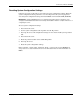
Note: Switch positions 7 and 8 are reserved for Compaq authorized service providers only. Do not change the
specified default setting for these positions, unless instructed otherwise.