
Compaq ProLiant ML350 Generation 2 Server Maintenance and Service Guide

Diagnostic Tools
3-4 Compaq ProLiant ML350 Generation 2 Server Maintenance and Service Guide
COMPAQ CONFIDENTIAL Codename: Forge Part Number: 236634-002 Last Saved On: 5/14/02 12:05 PM
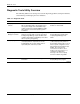
Table 3-1: Diagnostic Tools continued
Tool What it is How to run it
ROM Based Setup
Utility (RBSU)
Utility to configure some hardware installed in or
connected to the server. Specifically, it can:
• Resolve resource conflicts in areas such as
memory, port addresses, and interrupts (IRQs)
• Configure PCI boards automatically
• Provide switch and jumper settings
• Manage installation of memory, processor
upgrades, and mass storage devices such as
hard drives, tape drives, and diskette drives
• Store configuration information in nonvolatile
memory
• Configure the platform for an operating system
Run RBSU directly from the System
ROM by pressing the F9 key when
prompted during POST to enter the
utility.
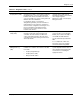
Automatic Server
Recovery 2 (ASR-2)
A tool that restarts the server automatically after a
catastrophic operating system failure, including
software errors, OS lockups, environmental
abnormalities, and some hardware errors.
Error information is logged to the IML (Integrated
Management Log). The server is reset and
restarted within 10 minutes of a system hang or
shutdown.
This tool is a function of the
hardware/software system through
RBSU. Verify that this tool is enabled
through RBSU. The systems
management drive must be loaded
to activate ASR.
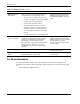
ROMPaq utility A utility that upgrades the current system ROM. Run from the ROMPaq diskette after
powering up the system.
SmartStart Diskette
Builder
Creates a diskette version of the utility from the
SmartStart Software for Servers CD.
Run from the SmartStart Software
for Servers CD.
For More Information
For detailed information about each of these diagnostic tools, see the Compaq Servers
Troubleshooting Guide on the documentation CD. For the most recent version of this guide,
go to
www.compaq.com/support/servers