
Compaq ProLiant ML350 Generation 2 Server Maintenance and Service Guide

Removal and Replacement Procedures
Compaq ProLiant ML350 Generation 2 Server Maintenance and Service Guide 2-39
COMPAQ CONFIDENTIAL Codename: Forge Part Number: 236634-002 Last Saved On: 5/14/02 12:00 PM
Feet (Tower)
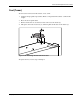
To remove the four feet from the chassis, one at a time:
1. Complete the preparation procedures. Refer to “Preparation Procedures” earlier in this
chapter.
2. Place the server upside down.
3. Remove the Torx T-15 screw that secures each foot to the chassis (1).
4. Lift up the other end of each foot (2), and then pull it off the base of the chassis (3).
3
2
1
Figure 2-34: Removing the feet from the chassis
To replace the feet, reverse steps 2 through 4.