
Compaq ProLiant ML350 Generation 2 Server Maintenance and Service Guide

Removal and Replacement Procedures
2-36 Compaq ProLiant ML350 Generation 2 Server Maintenance and Service Guide
COMPAQ CONFIDENTIAL Codename: Forge Part Number: 236634-002 Last Saved On: 5/14/02 12:00 PM
Server Feature Board Battery
WARNING: The Server Feature Board contains a lithium battery. There is a risk of fire
and chemical burn if the battery is improperly handled. Do not disassemble, crush,
puncture, or short external contacts, dispose of in water or fire, or expose the battery
to temperatures higher than 60°
°°
°C (140°
°°
°F).
CAUTION: Static electricity can damage the electronic components of the server. Before
beginning these procedures, be sure that you are discharged of static electricity by briefly
touching a grounded (earthed) metal object. Refer to “Electrostatic Discharge Information”
earlier in this chapter.
NOTE: It is necessary to remove the Server Feature Board from the unit to access and replace the
battery. Refer to “Expansion Slots” earlier in this chapter for instructions on removing and installing
expansion boards (including the Server Feature Board).
To replace the Server Feature Board battery:
1. Complete the preparation procedures. Refer to “Preparation Procedures” earlier in this
chapter.
2. Open the bezel door. Refer to “Bezel Door” earlier in this chapter.
3. Remove the access panel. Refer to “Access Panel” earlier in this chapter.
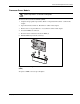
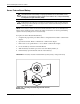
4. Locate the battery on the Server Feature Board.
5. Slide the battery toward the post at one side of the battery holder (1).
6. Lift the battery up from that side and out of its holder (2).
IMPORTANT: The battery should be installed with the positive polarity (+ side) positioned up.
1
2
Figure 2-31: Locating and removing a Server Feature
Board battery